A new laptop is one of the most popular Christmas presents — and one of the most expensive. A good refurbished laptop or PC gives you a far better machine for the same money, or the same machine for a lot less. Here’s why refurbished makes such a good gift, how to pick the right one for the person you’re buying for, and what to check before you wrap it.
Why refurbished makes a great present
- Better build for your budget. Most of our refurbished laptops are business models — Lenovo ThinkPad, Dell Latitude, HP EliteBook — built to survive years of daily office use. For the price of a new budget laptop, you get a much sturdier machine with a better keyboard and screen.
- Ready for the next few years. Every one runs Windows 11 with a fast SSD, so it will keep getting updates and security patches.
- Tested and covered. Each machine is checked before sale and comes with a warranty: 12 months on Grade A, 90 days on Grade B and C, with an optional 3-year extended warranty.
- Kinder to the planet. Giving a quality machine a second life saves the materials and energy that go into making a new one.
If you’re weighing up the options, our guide to new vs refurbished vs custom built compares them side by side.
Which refurbished computer for who?
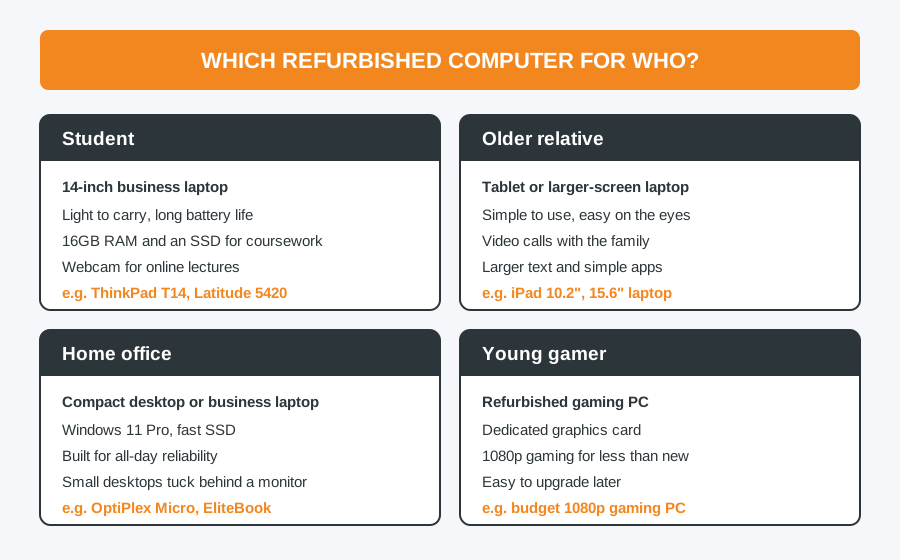
- Students need something light with good battery life, 16GB of memory and an SSD. A 14-inch ThinkPad or Latitude is ideal — see the best refurbished laptops for students.
- Older relatives often get on best with a tablet such as an iPad, or a laptop with a larger 15.6-inch screen. Think about what they’ll use it for: video calls, email and browsing don’t need a powerful machine.
- Home workers will appreciate a business laptop or a compact desktop like a Dell OptiPlex Micro, which tucks out of sight behind a monitor.
- Young gamers need a dedicated graphics card. A refurbished gaming PC gets them playing at 1080p for much less than new, and is easy to upgrade later.
What to check before you buy
- Windows 11. Avoid anything still on Windows 10 — it’s no longer supported, apart from extended security updates. See what Windows 10 users need to know.
- Memory and storage. 8GB is the minimum and 16GB is comfortable. Make sure it has an SSD rather than an old hard drive.
- The grade. Grade A looks close to new; Grade B and C have more visible wear but work just as well. Our guide to refurbished grades A, B and C explains the difference. For a present, Grade A is usually worth it.
- The warranty. Buy from a seller who offers a proper warranty and will be around to honour it.
Tips for buying a laptop as a gift
- Buy early. Refurbished stock is often one of each model, so the best machines go first. Couriers also get very busy in December.
- Check it before you wrap it. Switch it on when it arrives and make sure everything works. For online orders, your 14-day right to cancel runs from the day it’s delivered, not from Christmas Day — see our returns policy. Any genuine fault is covered by the warranty either way.
- Run the updates. Installing Windows updates before Christmas Day saves the new owner a long wait on the day itself.
- Collect in person. You’re welcome to collect from the shop for free, see the machine before you take it, and ask us any questions.
Find the right refurbished laptop or PC in Bolton
Browse our refurbished laptops and PCs, or call in at 30 Church Road, Bolton and we’ll help you choose. Not sure what to get? Tell us who it’s for and your budget, and we’ll point you to the right machine. Collection is free, or we can deliver by insured tracked courier.
Computer Repair Bolton
07538 513 916
support@computer-repair-bolton.co.uk