A fan that roars even when you’re just browsing, a base too hot to rest on your knees, or a laptop that slows down and switches itself off: these are almost always signs of heat. The usual causes are blocked vents, built-up dust or dried-out thermal paste, and most of them can be fixed.
Signs your laptop is overheating
- The fan runs loudly during light tasks like email or web browsing
- The base or keyboard gets uncomfortably hot
- It slows down after a few minutes of use, as the processor cuts its speed to protect itself
- It switches off without warning, especially during games or video calls
- A grinding or rattling noise, which usually means the fan bearing is wearing out
If your laptop is also freezing, our guide to a computer that freezes randomly covers other causes.
Where you use it matters
Most laptops draw cool air in through vents underneath and push hot air out of the side or back. On a bed, sofa or duvet, those vents are smothered.
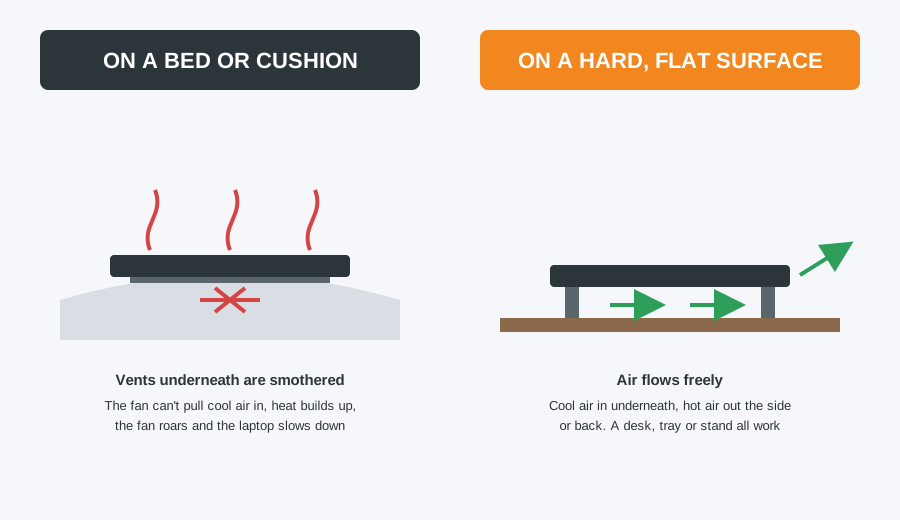
Use it on a desk or table, or on a lap tray or laptop stand if you’re on the sofa. A stand that lifts the back slightly helps airflow too.
Safe cleaning you can do yourself
- Shut the laptop down fully and unplug the charger.
- Find the vents, usually underneath and along the side or back edge.
- Using a can of compressed air held upright, blow short bursts into the vents.
- Don’t let the fan spin up fast in the airflow, as overspinning can damage it. Short bursts help, and if you can see the fan through the vent, hold it still with a wooden toothpick.
- Never use a vacuum cleaner. The suction and static can damage the fan and components.
Our 10-minute safe PC cleaning guide has more detail. This clears loose dust, but dust that has matted into a felt against the heatsink fins can only be removed by opening the laptop up.
Check what’s making it work hard
- Open Task Manager (Ctrl + Shift + Esc) and sort by CPU. A program constantly using a lot of processor power keeps the fan running. Unexpected heavy use can also be a sign of malware.
- Check Settings > System > Power & battery > Power mode. “Best performance” runs hotter than “Balanced”.
- Free tools such as Core Temp or HWiNFO show the processor temperature. Readings in the 90s °C while doing light work point to a cooling problem.
When a professional clean is worth it
Thermal paste sits between the processor and the heatsink and carries heat away. After a few years it dries out and stops working well. In the workshop, we strip the laptop down, clean the fan and heatsink fins properly, replace the old paste with fresh compound, and check the fan for wear. An older laptop often comes back running quieter, cooler and faster.
Need a hand? Call in or book a repair
Our internal clean and re-paste costs our standard £40 labour (£50 for Apple), with a replacement fan at part cost if yours is worn. It’s one of the most worthwhile repairs for an older laptop. See our laptop repair service for more.
Computer Repair Bolton
30 Church Road, Bolton
07538 513 916
support@computer-repair-bolton.co.uk
Book a repair online