Free cloud storage is a genuinely useful safety net for photos, documents and backups — but the free allowance varies a lot more between providers than the marketing usually suggests. Here is what you actually get, with accurate figures as of 2026.
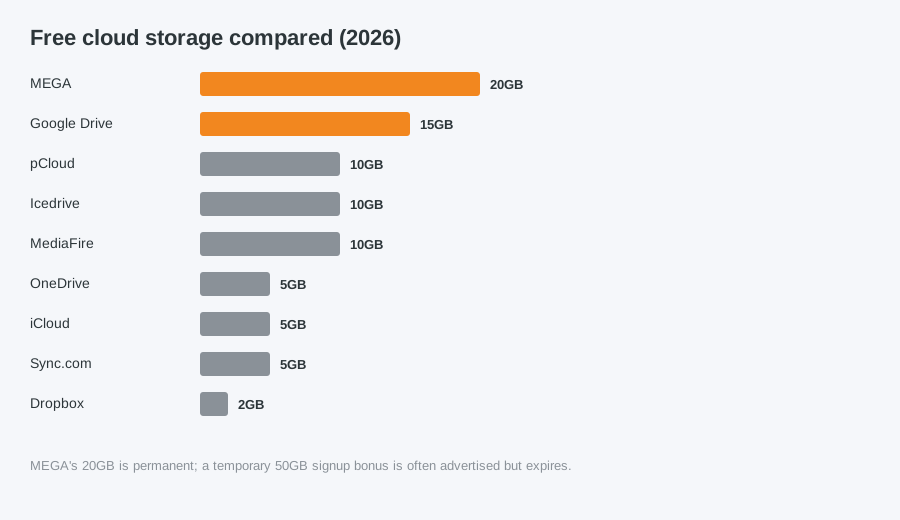
| Service | Free storage | Good for |
|---|---|---|
| MEGA | 20GB (permanent) | The most generous standard free tier, with end-to-end encryption |
| Google Drive | 15GB (shared with Gmail & Photos) | Best if you already use Gmail, but check what Photos is using |
| pCloud | 10GB | Good all-round option with a clean desktop app |
| Icedrive | 10GB | Simple, privacy-focused, no bandwidth throttling |
| MediaFire | 10GB | Easy file sharing via direct links |
| OneDrive | 5GB | Built into Windows 11, useful if you already have a Microsoft 365 subscription |
| iCloud | 5GB | Only worth it if you are fully in the Apple ecosystem |
| Sync.com | 5GB | Zero-knowledge encryption, aimed at privacy-conscious users |
| Dropbox | 2GB | The smallest free tier, but still widely used for sharing |
A word of caution
Some providers advertise much larger free allowances than what you actually keep long-term — MEGA, for example, is sometimes marketed at up to 50GB, but only 20GB of that is permanent; the rest is a temporary signup bonus that expires. Always check whether an advertised figure is the ongoing allowance or a limited-time bonus.
Cloud storage is not a full backup
Free cloud storage is great for syncing files across devices, but it should not be your only backup for anything irreplaceable, like family photos. We recommend keeping an additional local backup too, particularly before any repair work.
Computer Repair Bolton
07538 513 916
support@computer-repair-bolton.co.uk