Not all SSDs are the same shape, speed or interface, and picking the wrong type for your PC or laptop is a common mistake when upgrading. Here is what each type actually is and where it fits.
2.5″ SATA SSD
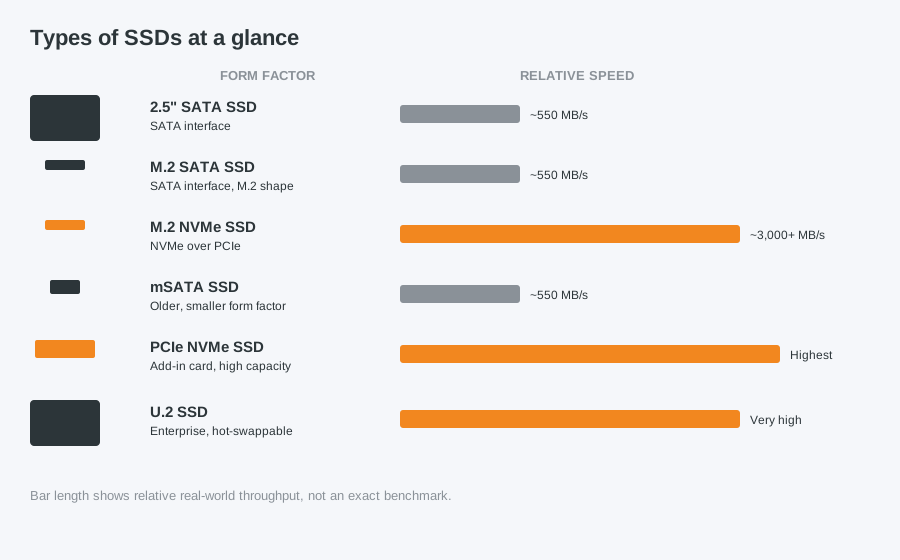
The same size and connector as a traditional laptop hard drive, making it the easiest drop-in upgrade for older laptops and desktops that do not support newer standards. Limited by the SATA interface to around 550MB/s.
M.2 SATA SSD
A small stick-shaped drive that slots directly onto the motherboard rather than connecting via cable. Despite the compact size, it still uses the SATA interface, so speed is the same as a 2.5" SATA drive — the benefit here is space and cable-free installation, not extra performance.
M.2 NVMe SSD
Physically similar to M.2 SATA, but it uses the NVMe protocol over a PCIe connection, which is several times faster — often 3,000MB/s or more. This is the best choice for most modern PC builds and laptops that support it, since it uses the same slot type as M.2 SATA but delivers far higher performance.
mSATA SSD
An older, smaller form factor mostly found in laptops and mini PCs from around 2012–2016. Largely superseded by M.2, so you will only need this if you are upgrading an older device that specifically uses it.
PCIe NVMe SSD (add-in card)
A full expansion card that plugs into a PCIe slot rather than an M.2 slot, typically used in workstations or servers needing very high sustained performance and capacity.
U.2 SSD
An enterprise-focused drive that combines NVMe speeds with the hot-swappable connector of traditional server drives. Rarely seen outside data centres and high-end workstations.
Which SSD is right for your PC?
Check your motherboard or laptop specifications before buying — not every M.2 slot supports NVMe, and fitting the wrong type will not work even though it physically fits the connector. If you are not sure what your machine supports, we can check for you and fit the right drive.
Already decided you want to upgrade? Read our guide on upgrading a laptop or desktop hard drive to an SSD, or get in touch and we will fit it for you.
Computer Repair Bolton
07538 513 916
support@computer-repair-bolton.co.uk