It’s easy to focus on the processor and graphics card when planning a PC, and treat the case as an afterthought. But poor airflow quietly holds back even the most powerful parts. Here’s why it matters and how to get it right.
Why airflow matters
Every component in your PC makes heat, and that heat has to go somewhere. Good airflow keeps temperatures down, so parts run more reliably, last longer and perform better. Many processors and graphics cards automatically slow themselves down when they get too hot, which directly costs you performance.
The basic rule: cool in, warm out
Cool air should come in at the front and bottom of the case, and warm air should leave at the back and top. Front intake fans bring in fresh air, and rear and top exhaust fans push heated air out, so air flows steadily through the case instead of heat pooling in one spot.
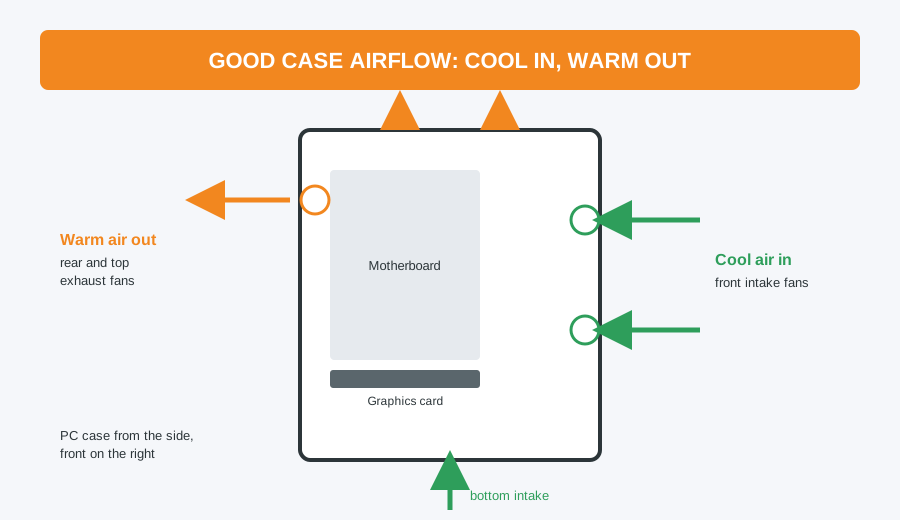
How many fans do you need?
- Basic home and office PCs: two or three fans (one or two intake, one exhaust) is usually plenty.
- Gaming PCs with a graphics card: three to five fans give noticeably better cooling, especially during long gaming sessions.
- High-end builds: more fans, plus a case designed around airflow, become worthwhile as heat output rises.
Case design matters as much as fan count
A mesh front panel lets far more air through than a solid or glass front, even with the same fans. If airflow is a priority, look for a case described as mesh-fronted or high-airflow.
Don’t forget the cables
Loose cables in the path of the air reduce how well your fans work. Route cables behind the motherboard tray, which most modern cases allow for, to keep the main space clear.
Balance airflow with noise
More or faster fans usually means more noise. Larger fans (140mm rather than 120mm) can move the same amount of air at a lower speed, so they’re quieter. Fewer, larger fans are often better than lots of small ones.
Keep the dust out
Dust filters on the intake fans stop the inside clogging up, but they need clearing every few months. A PC full of dust runs hot and loud however good the case is. Our safe PC cleaning guide shows how to do it.
Running hot already?
If your PC sounds like a jet engine or slows down under load, we can clean it out, fit extra or quieter fans and sort the airflow, for our standard £40 labour charge plus any parts. Building new? Our custom gaming PCs are built with airflow in mind.
Computer Repair Bolton
30 Church Road, Bolton
07538 513 916
support@computer-repair-bolton.co.uk
Book a repair online