Microsoft stopped supporting Windows 10 in October 2025, but millions of PCs in the UK are still running it — and many of them are perfectly good machines. The good news is that home users have been given more time than first announced: Microsoft has extended its free Extended Security Updates (ESU) programme for home PCs until 12 October 2027. Here is what that means, how to check your PC is covered, and how to use the extra year sensibly.
What has actually changed?
- 14 October 2025 — normal Windows 10 support ended. No more feature updates, fixes or free technical support.
- ESU — Microsoft’s safety net, which keeps sending critical security patches to enrolled home PCs. It was originally due to finish in October 2026.
- 12 October 2027 — the new end date for home users. If your PC is already enrolled, it carries on automatically. If it isn’t, you can still sign up.
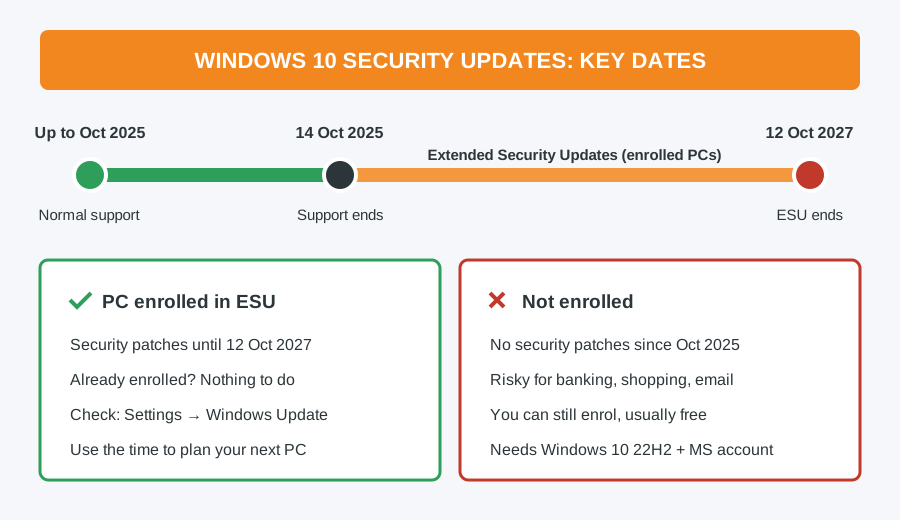
The catch: ESU only works if your PC is enrolled. A Windows 10 machine that never signed up has had no security patches since October 2025, and that is a real risk if you bank, shop or do email on it.
How to check if your PC is covered
- Open Settings → Update & Security → Windows Update.
- Look at the message near the top. If it says your PC is enrolled in Extended Security Updates, you are covered and don’t need to do anything.
- If instead you see an Enroll now link, your PC isn’t covered yet — follow the steps below.
How to enrol in Extended Security Updates
Your PC needs to meet a few requirements first:
- Windows 10 version 22H2 (press Windows key + R, type
winverand press Enter to check) - Home, Pro, Pro Education or Workstation edition
- All current Windows updates installed
- Signed in with a Microsoft account that has administrator rights (a local account won’t work)
Then click Enroll now in Windows Update and choose an option. Most people can enrol free by letting Windows back up their settings to their Microsoft account; there are also options to redeem Microsoft Rewards points or pay a small one-off fee. One enrolment covers up to 10 PCs on the same Microsoft account. Your PC does not need to be Windows 11 compatible to qualify.
No “Enroll now” link?
- Run
winver— anything older than 22H2 must be updated first. - Install every pending update and restart, then check again. If updates keep failing, see our guide to fixing failed Windows updates.
- If you sign in with a local account, switch to a Microsoft account in Settings → Accounts.
- Work or school PCs managed by an organisation use a different, commercial ESU scheme — ask your IT department.
What ESU doesn’t do
ESU is security patches only. There are no new features, no general bug fixes, and over time more software makers will stop supporting Windows 10 — browsers, banking apps and printer software are usually the first places people notice. Keep Microsoft Defender (or your own antivirus) running and up to date. Think of October 2027 as a deadline to plan for, not a reason to forget about it.
Your options before October 2027
- Upgrade to Windows 11 for free if your PC is compatible. Microsoft’s PC Health Check app will tell you. Most PCs from around 2018 onwards (8th-generation Intel or Ryzen 2000 and newer) qualify.
- Upgrade the hardware you have. An SSD and extra memory can make an older Windows 11-compatible PC feel new for a fraction of the cost of replacing it — see the most cost-effective hardware upgrades.
- Replace it with a refurbished Windows 11 machine. If your PC is too old for Windows 11, a quality refurbished laptop or desktop is often cheaper than a new budget model and better built. Our guide to refurbished grades A, B and C explains what you’re getting, or browse our refurbished laptops.
- Keep using it offline. An older PC used for a specific job without internet access — running old software or a machine in a workshop — can carry on safely.
Not sure which way to go? Our guide on whether to repair or replace your laptop or PC walks through the decision. Whatever you choose, back up your files first.
Need a hand? Computer Repair Bolton can help
We can check whether your PC qualifies for Windows 11, enrol it in ESU, carry out the Windows 11 upgrade with your files and programs moved across, or fit an SSD and memory to give it a new lease of life. Most jobs are a flat £40 labour charge (£50 for Apple), with any parts at cost, and we take a full backup of your data before we start. Book a repair or drop into the shop at 30 Church Road, Bolton.
Computer Repair Bolton
07538 513 916
support@computer-repair-bolton.co.uk