Whether you’re upgrading a PC or buying a new one, storage is one of the first decisions you’ll make, and one of the easiest to get wrong. Solid state drives (SSDs) and hard disk drives (HDDs) do the same basic job of storing your files, photos, games and Windows itself, but they work very differently.
The short version
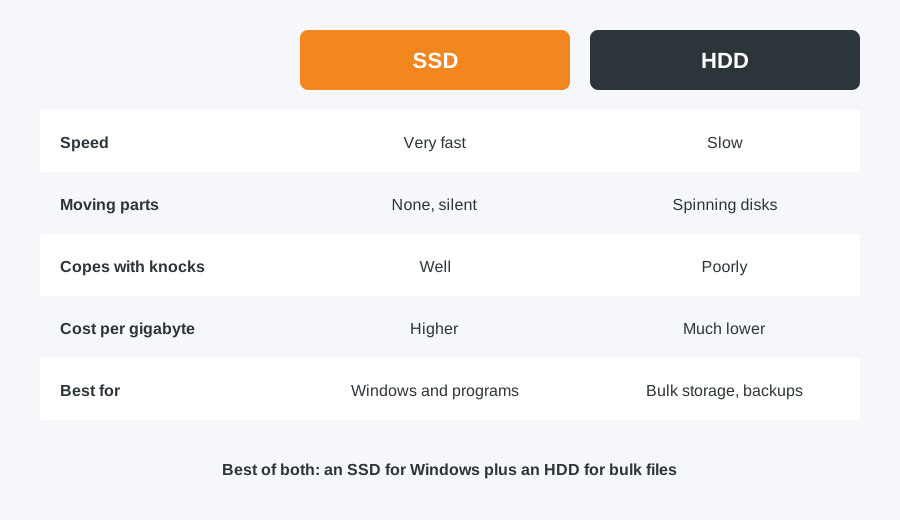
SSDs are faster, quieter and cope better with knocks, but cost more per gigabyte. HDDs are slower, but give you far more space for your money. Most people are best served by an SSD for Windows and everyday programs, with an HDD added for bulk storage if they need lots of space cheaply.
Why SSDs are faster
An SSD stores data on memory chips with no moving parts. That means near-instant access to files, much faster start-up, and programs that open in seconds rather than tens of seconds. If you’ve ever sat waiting for an older PC to boot, an SSD is very likely the biggest single upgrade you can make. There are several types, from SATA to NVMe, explained in our guide to types of SSD.
Why HDDs still have a place
An HDD stores data on spinning magnetic disks, which is why it’s slower. But that older technology is much cheaper per gigabyte. If you need several terabytes for a big photo or video library, backups or archived files, an HDD often makes more financial sense. Being mechanical, they also wear out, so keep a backup of anything important.
Which should you choose?
- Everyday use, browsing and office work: a 500GB to 1TB SSD covers most people comfortably.
- Gaming: an SSD cuts loading times dramatically, and many modern games now list one as a requirement.
- Video editing and large creative files: a fast SSD for current projects, with an HDD for finished work, gives you the best of both.
- Cheap bulk storage: an HDD is still the most affordable way to store large amounts of data.
A practical middle ground
Many of our customers run a smaller SSD for Windows and their most-used programs, with a larger HDD for everything else. You get speed where it counts without paying SSD prices for space that’s mainly used for storage.
Upgrade your current PC or laptop
You don’t need a new computer to get SSD speed. We can fit an SSD and move Windows, your programs and your files across, so everything is just as you left it, only faster. See how an SSD upgrade works, or browse our solid state drives and hard drives. Fitting is our standard £40 labour charge (£50 for Apple).
Computer Repair Bolton
30 Church Road, Bolton
07538 513 916
support@computer-repair-bolton.co.uk
Book a repair online