Graphics cards range from budget models under £150 to enthusiast cards costing well over £1,000. The difference isn’t just price; it’s about what you actually want your PC to do. Here’s how to cut through the marketing and pick the right one.
Start with what you’ll use it for
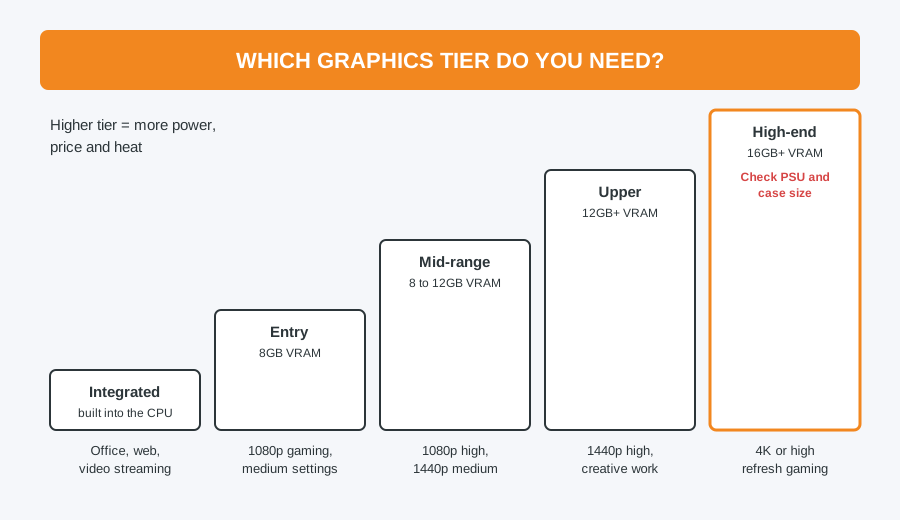
- Office work, browsing and video: you probably don’t need a separate graphics card at all. Many processors have capable graphics built in.
- 1080p gaming at medium settings: an entry to mid-range card handles this comfortably and affordably.
- 1440p gaming at higher settings: mid to upper-range cards are the sweet spot.
- 4K or high refresh-rate competitive gaming: you need a high-end card to keep frame rates smooth.
- Video editing, 3D and creative work: look for more video memory and strong results in creative software tests, not just gaming benchmarks.
Don’t ignore VRAM
VRAM is the graphics card’s own memory, and it affects how well the card copes with high resolutions, detailed textures and creative work. As a rough guide, 8GB is the minimum for gaming today, 12GB is better for 1440p, and 16GB or more makes sense for 4K and for keeping up with future games.
Check your PC before you buy
Powerful graphics cards draw a lot of power and are physically large. Before choosing one, check:
- Your power supply’s wattage, and that it has the right power connectors for the card
- That your case has room for the card’s length and thickness
- That your motherboard has a suitable PCIe slot (almost all modern ones do)
A bigger card also produces more heat, so good case airflow matters more.
Balance it with the rest of the system
Pairing a powerful graphics card with a weak processor wastes much of what you paid for, which is called a bottleneck. Aim for a graphics card and processor in a similar tier, rather than a top-end card with budget parts elsewhere.
Last generation can be great value
When a new generation of cards launches, the previous one often drops in price while still being very capable. If you don’t need the very latest features, a previous-generation card can be excellent value.
Let us match it for you
We can spec the right card into a custom gaming PC, or fit a card you’ve bought into your existing PC and check your power supply can handle it first, for our standard £40 labour charge. Not sure whether to build or buy? Read pre-built vs custom build.
Computer Repair Bolton
30 Church Road, Bolton
07538 513 916
support@computer-repair-bolton.co.uk
Book a repair online